Summarize this text with artificial intelligence
Choose your preferred tool to generate a short summary of the text.
Although there are many different ways to make money online in today's world, selling on eBay is a highly advantageous option. It is natural for beginners to have questions such as what eBay is and how it works. Especially, do not let the eBay selling process discourage you, as it may seem difficult at the beginning. With the eBay selling guide we have prepared for you, you can clear all the question marks in your mind and take stable steps forward by making a solid entry into online commerce.

What is eBay?
eBay, which is one of the global online marketplaces, is an e-commerce site that provides advantages to its users for making sales. Operating in many countries around the world, eBay is not only an e-commerce site specialized in selling, but it also creates a global trade network by bringing millions of sellers and buyers together.
Making it easy for you to become a customer without paying any fees, eBay only charges listing fees for you to make sales. Selling on eBay, whose listing fees are quite low compared to other e-commerce sites, is a very advantageous option. In addition to the low costs you pay to sell on eBay, you can also build your own customer base in a global marketplace and reach eBay's extensive customer network.

Why Should You Sell on eBay?
We can say that eBay ranks between Amazon and Etsy in terms of popularity among sellers worldwide. While you can reach a wide and diverse market audience on eBay, just like selling on Amazon, the platform's registration, setup, and product listing management processes are simpler compared to Amazon.
Compared to Etsy, which requires you to pay a fee the moment you list a product, you can list on eBay for free for a certain period of time.
It can be said that eBay is the best option for online sellers who want to sell faster with less effort. It is highly popular due to its wide market audience, easy registration & setup options, and the opportunities it offers.
How to Sell on eBay?
First Step: Create a Seller Account
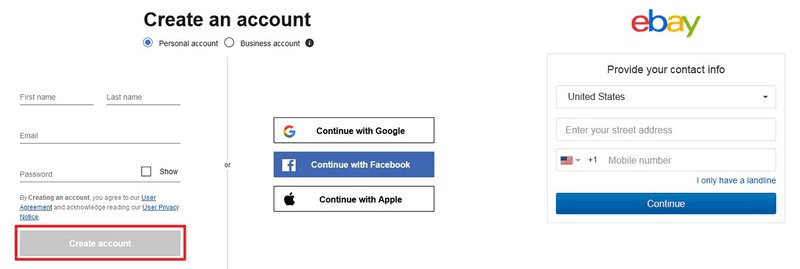
After determining the type of sale and store you want to create on eBay, the first thing to do is to open a seller account. eBay has a very easy-to-use interface for opening an account. First, you need to go to eBay's website and click on the register button in the upper left corner of the homepage. When you click on the register button, eBay will ask for your personal information. After filling in your personal information, you can easily create your account by clicking the register button.
Second Step: Create a Listing for Your Products
The next step after opening an account on eBay is to create a listing so that customers can find your products. The products in the listings must have high-quality photos, and what they are and what they do must be clearly described. Using a simple language that everyone can understand will make you stand out. In addition, consistent pricing will increase users' trust.
Most of the products in your store are likely also offered by many of the sellers on eBay. The key here is to effectively format the first few listings you create. It is recommended that you check similar product listings and format your listings properly during the eBay product listing process.
Third Step: Start Selling
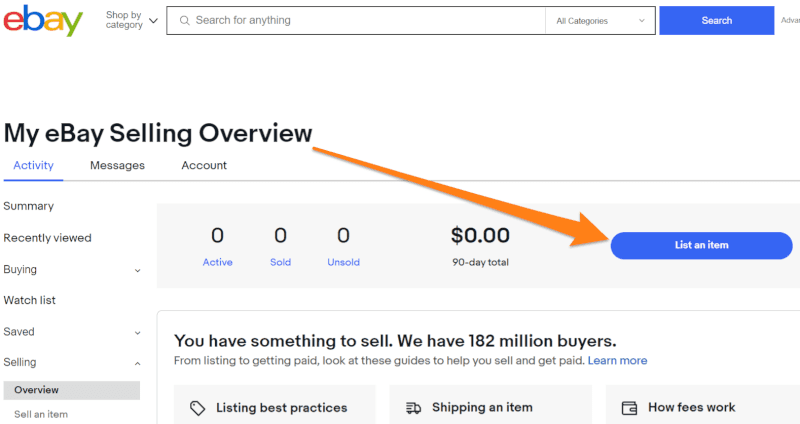
After listing and registering your products, all that's left is to wait. Selling products on eBay is a task that requires effort, but it is also a process that requires patience. While waiting for the products in your listing to sell, do not neglect to check the "Selling" tab.
This is because you need to see if there are any offers on your products. Fast callback means quality customer service. Quality customer service always brings a good reputation, and this reputation brings loyal customers.
What are the Store Types and Listing Features on eBay?
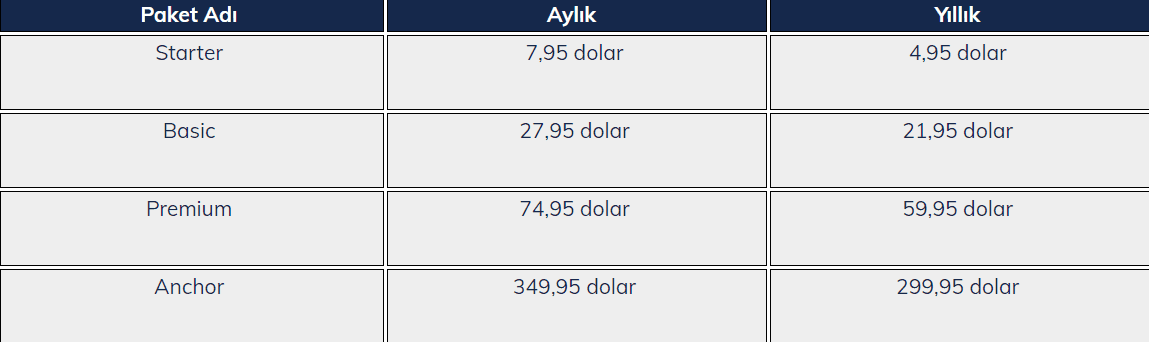
eBay, which is a global marketplace, has 4 different store types. These store types are: starter, basic, premium, and anchor. In order to become a seller on eBay, you must choose one of these store subscriptions. These store subscriptions and their pricing are as follows;
While the monthly Starter package costs $7.95, the monthly fee decreases to $4.95 when purchased annually. In other packages, prices vary on a monthly and annual basis, while the eBay commission rate also differs.
While the monthly price of the Basic store package, which is an upgraded version of the Starter package, is $27.95, the monthly fee you will pay decreases to $21.95 in annual pricing. In the Premium package, monthly pricing is determined as $74.95, and the annual price is $59.95. The monthly fee for the Anchor package, which offers an exclusive selling service on eBay, is $349.95, which goes down to $299.95 when the annual plan is preferred.
eBay determines the price for product listing according to the store subscription type. On eBay, a platform that provides different opportunities, the first 250 items in the Basic subscription are subject to a fixed price, while the first 250 auction items are also included in the package price in the Auction sales method.
Free listings increase depending on response subscription types. For example, while the first 1000 listings are free in the premium subscription, this number goes up to 10,000 in the Anchor subscription.

How to Upload Products to eBay?
Uploading products to eBay is carried out through simple steps such as adding a product name and photo. There are external elements to keep in mind in the product uploading process. These elements will boost your sales and multiply your profits. You can load your products correctly to your store by following the steps below.

Add Product Title
Click the "My eBay" button on your eBay seller account homepage. After being redirected to the My eBay page, click on the "Selling" button on that page and type the title of the product you want to add to your store in this section.
Add Quality Product Photos
After finishing the first step of adding a product title, you will see a screen where you can add product photos. Although eBay provides stock photos about the products, actual photos of the product taken in a real-life environment build trust in customers. The quality and angle of the photos taken in a real environment are also very important for customer trust.
Take Care to Write Clear Product Descriptions
Product descriptions are a critical detail for eBay users. Having clear product descriptions is an important factor that will increase your conversion rates. In addition, the technical features of the products build trust by providing more information to the target audience of the product.
Set Consistent Product Prices
Product pricing, which is the final stage of the product uploading process to eBay, is a stage that must be approached strategically. eBay displays prices for similar products to give sellers an idea. Therefore, you can get support from eBay in your pricing strategy. A consistent pricing policy that you determine by considering the product prices offered by eBay is a sign of a path to success.
However, it is worth noting that eBay offers you two different selling methods. The pricing strategies and policies of these two different selling methods should be different. The first of the selling methods and undoubtedly the reason for eBay's development is the auction method.
In this selling method, the product is sold to the highest bidder. Also, in this selling method, you can follow a low-to-high strategy in prices. However, in direct online shopping, which is the second selling method, your products must have a fixed price.
What are eBay Commission Rates?
There are different packages for you to sell on eBay, and these packages have different commission rates. In eBay, which has 2 different types of commissions, the listing insertion fee charged when creating a listing and the final value fee of the sold product are subject to commission.
eBay commission rate varies according to price, category, and seller performance. Offering you the first 250 listings for free, eBay charges separate commissions for each listing and category once you exceed this limit.
The commission amount deducted from the final value fee after selling the product may vary according to categories. Usually, this fee is $0.30 per order.
What are the Best Selling Products on eBay?
Among the best-selling products on eBay, the popular ones are as follows:
• Books and magazines
• Antique items
• Clothing and footwear
• Electronic devices
• Event tickets
• Watches and jewelry
• Toys and adult games
• Home decor products
• Music albums and instruments
• Sporting goods
• Fitness and pilates equipment
However, it is worth noting that products like alcohol, tobacco, weapons, and hazardous materials cannot be sold or bought.
Is it Possible to Make Money with eBay?
According to Statista data, the number of users on eBay reached 185 million in the period from the first quarter of 2010 to the last quarter of 2020, and an average of 1.3 billion products were listed every day. These figures make selling products on eBay attractive for many online merchants.
Let's note that eBay brings buyers and sellers together in 190 different markets around the world and stands out as the second most visited marketplace with 1.7 billion monthly visits since April 2021. The title of the world's most visited marketplace belongs to Amazon, the most popular e-commerce channel of all time.
Among more than 19 million seller accounts on eBay, 31% of the sellers are from the USA, 29% from the UK, and they are followed by Germany and China with seller rates of 15% and 12%, respectively.
Generating $10.2 billion in revenue in 2020, eBay's gross merchandise value, which represents the total sales value of all goods and services, is over $100 billion.
Looking at all these statistics, it can be said that eBay is an important and effective channel for online commerce sellers who want to make fast money by exporting to different markets. The ability to sell in many categories, list products without paying fees for a certain period, and easy store setup make eBay even more attractive for online sellers.

How to Get Paid on eBay?
The most preferred method among eBay payment methods is payment through the "managed payment" system. This application aims to optimize all payments in a single system, and the payments that sellers will receive are transferred directly to their bank accounts. Claiming the money transferred to your bank account requires a few steps, which are listed as follows:
• First of all, you need to link your eBay account to a checking bank account.
• Then, click on the payments button in the "Seller Hub" tab.
• After being redirected to the "Payment" tab, click on the "edit" button next to the "payout method" button on the same page.
• Fill in the requested info on the page.
• Immediately after this step, save your bank account by clicking "update bank account".
In addition, managed payment does not only offer you payment services but also helps you manage many transaction processes such as reporting, refunds, tax statements, and shipping labels through a single application. Before the managed payment system, eBay allowed the PayPal online payment system to be used.
PayPal is a reliable payment system. However, it is not a payment system active in Turkey. While eBay sends payments via PayPal to sellers abroad, another system is needed because it is not used in Turkey. However, you do not need to worry. eBay offers a different payment method for transactions in Turkey.
How to Get Paid on eBay Without Using PayPal?
Besides being a platform that offers sales and payment options without PayPal, eBay offers "managed payment" which allows its sellers' payments to be deposited directly into their accounts. To benefit from this system, all you need to do is link your personal bank account if you have an individual account. If you have a Business account, it is sufficient to link your corporate bank account.

What are the Advantages of Selling on eBay?
Offering a global e-commerce marketplace, eBay not only allows millions of entrepreneurs to show themselves but also shares its wide target audience with these entrepreneurs as an advantage. The general advantages of eBay, which is a giant among popular e-commerce platforms, can be listed as follows:
• With the auction option, you can sell your products at a higher price.
• Well-established and secure, eBay has loyal customers, and this wide customer base might also choose you as long as you are reliable.
• eBay commission rates and fees are lower compared to other e-commerce platforms.
• If you are going to sell on eBay, you do not need an additional website. This is because eBay has an almost perfectly functioning search engine.
• eBay, being a giant marketplace, makes you feel that your sales potential is limitless.
• Standing out with logistics opportunities, eBay values its sellers with low shipping rates.
What are the Disadvantages of Selling on eBay?
Selling on eBay, which has its disadvantages as well as advantages, is a process where you need to take various risks and responsibilities. The disadvantages that might exhaust you in this process can be listed as follows;
• Competition is high on eBay, which is a global brand. Therefore, you must take careful steps to promote your brand and products.
• On eBay, which is not an ideal platform to build a new brand and increase brand value, users usually search for specific products. If you do not have a well-known brand, it is very difficult to stand out.
Taking the right steps by keeping all these advantages and disadvantages in mind will lead you to success. However, online commerce is a dynamic sector, and keeping up with innovations is highly important. Navlungo helps you step firmly raw steps to success by tracking the requirements, innovations, and sector details of e-commerce for you.

eBay Logistics Processes
When adjusting the shipping planning of your orders coming from eBay, take care to be as meticulous as possible, to pack them securely, and to accurately inform your customers about delivery times. You can manage the logistics processes of your incoming orders yourself, or you can allocate more time to growing your business by working with a solution-oriented company.
Thanks to Navlungo's integration with eBay, as with dozens of other marketplaces, you can ship your eBay cargo hassle-free and in a planned manner.